Hub slot 1
Test Oct 4
Tests a route that positions the scoop and lift arm, drives measured distances, and turns to planned headings.
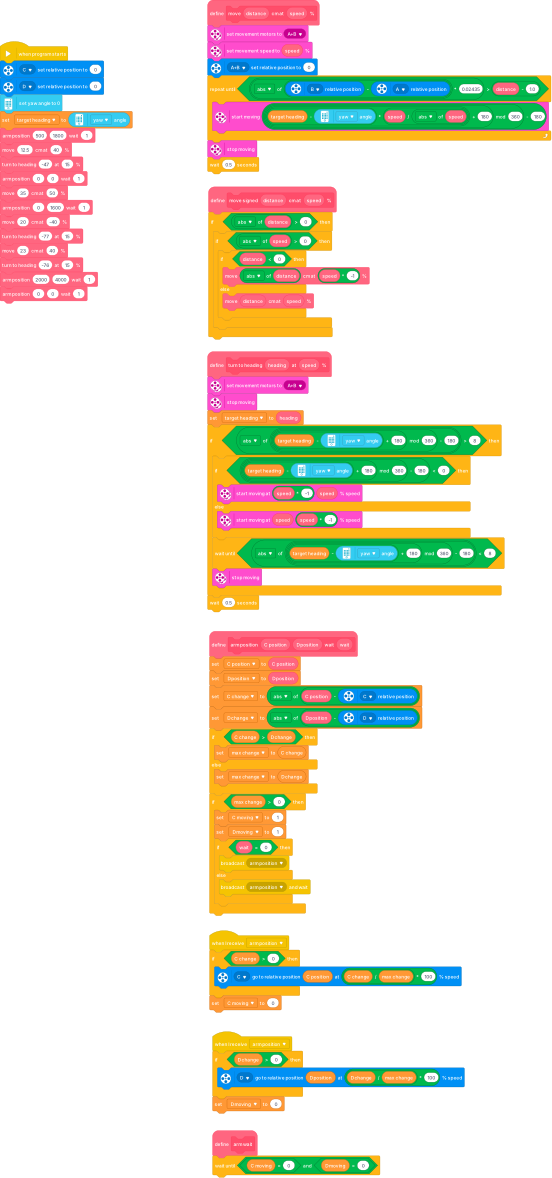 Click to enlarge the Word BlocksClick to shrink the Word Blocks
.bw code
DEVICE LEGO_SPIKE

TARGET "Robot":
  VARIABLE "target heading" = "-76"
  VARIABLE "C position" = "0"
  VARIABLE "D position" = "0"
  VARIABLE "C change" = "1998"
  VARIABLE "D change" = "3996"
  VARIABLE "max change" = "3996"
  VARIABLE "C moving" = "0"
  VARIABLE "D moving" = 0
  DEFINE arm position (C position) (D position) wait (wait):
    set C position to (C position)
    set D position to (D position)
    set C change to (abs of ((C position) - (C relative position)))
    set D change to (abs of ((D position) - (D relative position)))
    IF C change > D change THEN:
      set max change to C change
    ELSE:
      set max change to D change
    IF max change > "0" THEN:
      set C moving to "1"
      set D moving to "1"
      IF (wait) = "0" THEN:
        broadcast "arm position"
      ELSE:
        broadcast "arm position" and wait

  WHEN I receive "arm position":
    IF C change > "0" THEN:
      C go to relative position C position at ((C change / max change) * 100) % speed
    set C moving to "0"

  WHEN I receive "arm position":
    IF D change > "0" THEN:
      D go to relative position D position at ((D change / max change) * 100) % speed
    set D moving to "0"

  DEFINE arm wait:
    wait until (C moving = "0") and (D moving = "0")

  WHEN program starts:
    C set relative position to 0
    D set relative position to 0
    set yaw angle to 0
    set target heading to (yaw angle)
    arm position "500" "1800" wait "1"
    move "12.5" cm at "40" %
    turn to heading "-47" at "15" %
    arm position "0" "0" wait "1"
    move "35" cm at "50" %
    arm position "0" "1600" wait "1"
    move "20" cm at "-40" %
    turn to heading "-77" at "15" %
    move "23" cm at "40" %
    turn to heading "-76" at "15" %
    arm position "2000" "4000" wait "1"
    arm position "0" "0" wait "1"

  DEFINE move (distance) cm at (speed) %:
    set movement motors to A+B
    set movement speed to (speed) %
    AB set relative position to 0
    REPEAT UNTIL ((abs of ((B relative position) - (A relative position))) * 0.02435) > ((distance) - 1.0):
      start moving (((((target heading - (yaw angle)) * ((speed) / (abs of (speed)))) + 180) mod 360) - 180) steering
    stop moving
    wait 0.5 seconds

  DEFINE move signed (distance) cm at (speed) %:
    IF (abs of (distance)) > "0" THEN:
      IF (abs of (speed)) > "0" THEN:
        IF (distance) < "0" THEN:
          move (abs of (distance)) cm at ((speed) * -1) %
        ELSE:
          move (distance) cm at (speed) %

  DEFINE turn to heading (heading) at (speed) %:
    set movement motors to A+B
    stop moving
    set target heading to (heading)
    IF (abs of ((((target heading - (yaw angle)) + 180) mod 360) - 180)) > "8" THEN:
      IF ((((target heading - (yaw angle)) + 180) mod 360) - 180) < "0" THEN:
        start moving at ((speed) * -1) left (speed) right % speed
      ELSE:
        start moving at (speed) left ((speed) * -1) right % speed
      wait until (abs of ((((target heading - (yaw angle)) + 180) mod 360) - 180)) < "8"
      stop moving
    wait 0.5 seconds
Hub slot 2
Manual Arm Control Left
Motor C tips the scoop. Hold the left hub button for counterclockwise motion or the right button for clockwise motion. Releasing the button stops the motor.
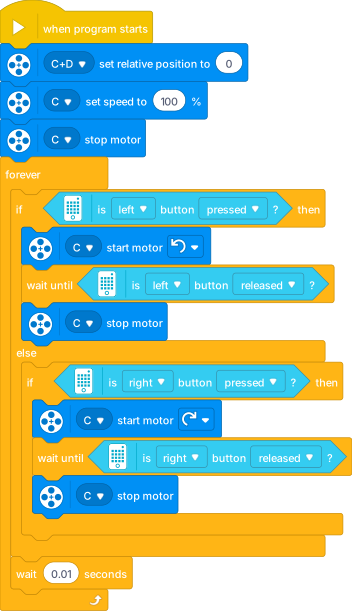 Click to enlarge the Word BlocksClick to shrink the Word Blocks
.bw code
DEVICE LEGO_SPIKE

TARGET "Robot":
  WHEN program starts:
    CD set relative position to 0
    C set speed to 100 %
    C stop motor
    FOREVER:
      IF is left button pressed? THEN:
        C start motor counterclockwise
        wait until is left button released?
        C stop motor
      ELSE:
        IF is right button pressed? THEN:
          C start motor clockwise
          wait until is right button released?
          C stop motor
      wait 0.01 seconds
Hub slot 3
Manual Arm Control Right
Motor D raises and lowers the lift arm. The same two hub buttons choose opposite directions; releasing either button stops the motor.
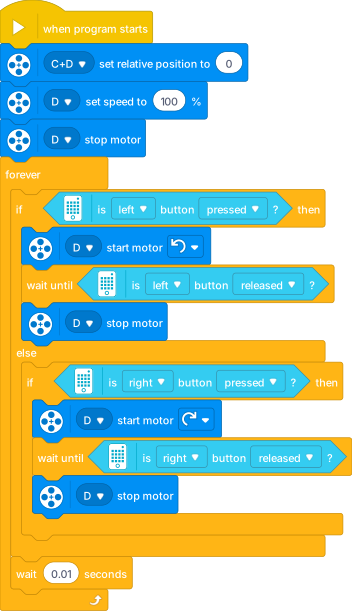 Click to enlarge the Word BlocksClick to shrink the Word Blocks
.bw code
DEVICE LEGO_SPIKE

TARGET "Robot":
  WHEN program starts:
    CD set relative position to 0
    D set speed to 100 %
    D stop motor
    FOREVER:
      IF is left button pressed? THEN:
        D start motor counterclockwise
        wait until is left button released?
        D stop motor
      ELSE:
        IF is right button pressed? THEN:
          D start motor clockwise
          wait until is right button released?
          D stop motor
      wait 0.01 seconds
Hub slot 4
Manual Arm Control Both
Motor C tips the scoop while motor D moves the lift arm. The two motors run together; the hub buttons choose opposite directions, and releasing the button stops both.
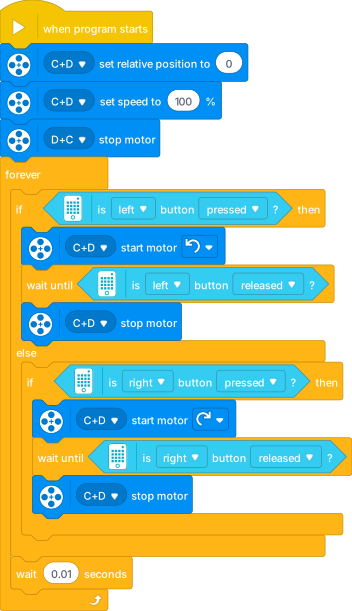 Click to enlarge the Word BlocksClick to shrink the Word Blocks
.bw code
DEVICE LEGO_SPIKE

TARGET "Robot":
  WHEN program starts:
    CD set relative position to 0
    CD set speed to 100 %
    DC stop motor
    FOREVER:
      IF is left button pressed? THEN:
        CD start motor counterclockwise
        wait until is left button released?
        CD stop motor
      ELSE:
        IF is right button pressed? THEN:
          CD start motor clockwise
          wait until is right button released?
          CD stop motor
      wait 0.01 seconds